
The Ultimate Guide Claude AI is one of the most popular chatbots on the market, and many users believe that the service is only available for a fee. In reality, Claude provides an excellent free plan, which is available to anybody who wishes to sign up. This guide will discuss how to utilize Claude for free in 2026, as well as the benefits and drawbacks of the free plan compared to the paid options.
Is Claude AI Really Free in 2026?
Yes. Claude AI has a genuine free plan. You don’t need a credit card. You don’t need a trial period. The free plan doesn’t expire.
Here’s how to sign up: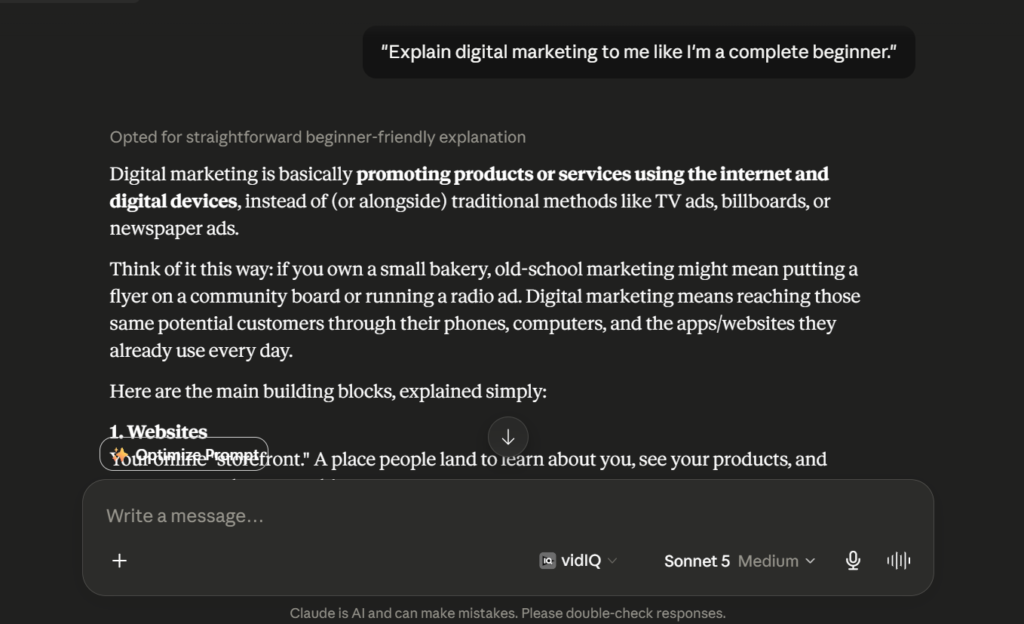
- Go to claude.ai
- Sign up with a Google account, an Apple ID, or your email address.
- Skip any payment step — none is required.
- Start chatting right away.
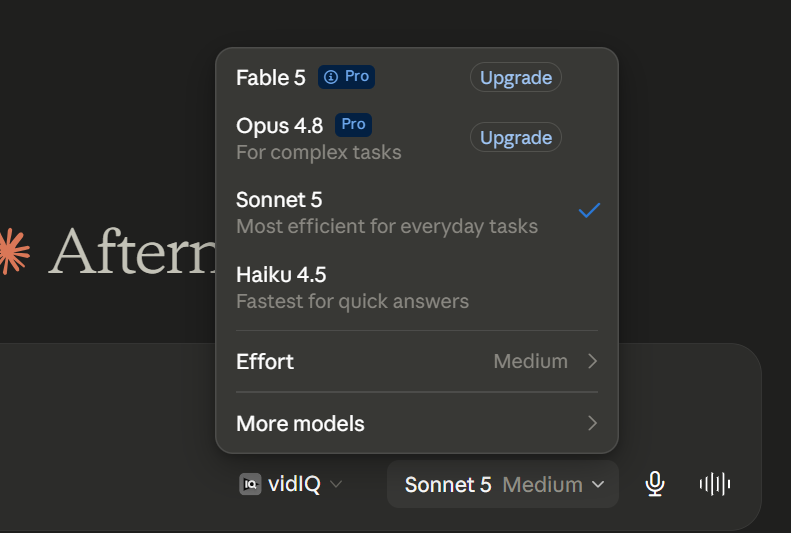
As of June 30th 2026, Claude Sonnet 5 has become the default model for both the Free and Pro subscriptions. Claude AI’s latest iteration is a versatile model, which can quickly handle a wide range of tasks, including writing, coding, research, and everyday conversations. Claude Sonnet 5 is not some underwhelming demo version – it is a fully-fledged and powerful AI model, which numerous companies use to power their operations on a daily basis.
What You Get with the Claude AI Free Plan
Many users upgrading to the paid Claude plan are surprised by the amount of features they receive for their monthly fee.
Luckily, the free Claude AI version also includes numerous handy tools, including:
- Claude Sonnet 5 – see above.
- 200k context window – allows chatting about long documents and code, as well as analyzing lengthy texts.
- Web search – enhances Claude’s knowledge, eliminating the need to rely solely on the model’s training data.
- File upload – enables the use of uploaded PDFs, Word documents, excel sheets, and images in conversations with Claude.
- Projects and Artifacts – organize information and create documents, code, and images with Claude.
- Memory – gives Claude access to the conversation history.
- Basic MCP connectors – connect Claude to external apps like Notion, Slack, and Google Workspace.
- Code execution – execute and test code snippets.
These features represent a substantial amount of value, and most everyday users will be able to complete their tasks without upgrading to the paid Claude plan.
What the Free Claude Plan Does Not Include
As mentioned in the introduction, Claude’s free plan is extremely generous but still has several notable limitations. The most important restrictions applicable to the free Claude version in 2026 include:
- No access to Opus – for now, Anthropic only allocates access to the highest-level language model (Opus 4.8) to the paid users.
- Limited capacity – the number of Claude messages per user per 5-hour period typically varies between 15 and 40, which equals approximately 30-100 messages per day depending on the complexity of the prompt.
- No Claude Code – the advanced coding tool is only available to Pro and higher subscriptions.
- Limited Research tools – while Claude can perform simple research tasks, complex multi-source analyses are best left to paid plans.
- Peak-hour limitations – the capacity decreases substantially during weekday hours between 5 am and 11 am Pacific Time.
- Fewer responses during peak hours – during busier times, the Claude team prioritizes requests from business subscribers.
- Data usage for training – some Pro and Team accounts can opt out of this policy, but the free Claude users cannot.
Paid or Free Claude: What is it really worth
If you are debating between a paid or a free, it really boils down to how frequently you find yourself hitting the message limit, rather than a difference in the features themselves, since many features have been equalized between the two accounts. What’s included in both plans is Claude Sonnet 5 (default model for both Pro and free tier as of June 30th, 2026), Projects, Artifacts, web searches, file upload, and Memory.
What you get with Pro ($20/month or $17/month if billed annually) are:
- ~5x more usage per 5 hour window, which is by far the most requested upgrade.
- Priority access during peak hours, when you otherwise might be throttled to a lower model.
- Access to Claude’s highest performing models (Opus 4.8 and Fable 5) Claude Code for professional coding needs.
- Full MCP connector support, whereas with a free account you get only the basic set of connectors.
How to Get More Out of Your Free Claude Account
Several simple strategies can help the user get more value out of their free Claude subscription.
First and foremost, the free Claude subscribers should always aim to keep their prompts as concise as possible. Long prompts eat up the capacity much faster than short and clear ones.
Second, it is important to utilize the adaptive thinking feature strategically. The higher degree of contextual understanding translates to more accurate answers but also to a faster consumption of the limited capacity.
The third tip is to batch prompts when possible and ask multiple questions in a single query. Additionally, it is recommended to avoid using Claude during peak hours when capacity is limited. The usage of Claude projects can also be beneficial – the user should make sure to store their prompts in them whenever possible.
Finally, the document upload feature can be a convenient way to submit information to Claude, which may be faster than copying-pasting text from various sources. It is critical to remain wary of third-party Claude hacks and tools, which promise to give the user access to features like Opus, Claude Code, and limitless messages for free.
In reality, these schemes typically attempt to trick the user into downloading malicious software, which can gain unauthorized access to the Claude account. The only way to obtain advanced Claude features is to subscribe to Pro, Max, Team, or Enterprise plan directly from Anthropic.
If the video claims to demonstrate a particular “installation process,” which involves vague explanations and ambiguous outcomes, it is best to disregard such content.
When to Upgrade to the Paid Claude Plan

Whether or not it is worth upgrading to the paid Claude plan ultimately depends on the individual user’s priorities. Upgrading to Claude Pro may be worth considering if the free Claude subscription does not provide enough capacity for the user’s intended purposes.
Claude Pro costs 20$ per month (or 17$ per month with an annual billing). It provides roughly 5x more capacity than the free plan and unlocks Claude Code. Claude Max plans, which begin at 20x Pro capacity, also offer 20x more capacity than the free Claude subscription and can be a great choice for heavy users.
Claude free plan in 2026 has plenty of valuable assets, which enable a broad range of applications. Users who wish to utilize Claude for free are advised to consider the capabilities and limitations of the free subscription. While Claude for free has plenty of benefits, such as a generous token allowance, the ability to use Claude Sonnet 5, file upload option, and enhanced security, it still lacks some features that regular users may find necessary.
Want to Master AI or Learn New Skills?
f you have read this far, it is clear that you are the type of person who likes to understand what they use, not just use it. That is the kind of people who will learn to use these tools in the right way with the right instructor.
At IP Tech Computer Institute, we will teach you how to use AI, Digital Marketing, ADCA, and more in a practical way that is easy to understand and use. You will learn the skills you need to be successful in your career, business, or job.
We also have a free workshop that you can join to help you get started. No pressure, no obligation, just a chance to see what we can teach you.
Visit IP Tech Computer Institute today and start learning AI the smart way.
Conclusion
Claude AI’s free plan in 2026 is genuinely useful — you get Claude Sonnet 5, web search, file uploads, and Artifacts, all without paying a single rupee or entering any card details. For most everyday tasks like writing, learning, and simple research, the free plan works really well. If you need more speed, higher limits, or advanced tools like Claude Code, then upgrading to Pro or Max makes sense.
AI tools like Claude are becoming a big part of daily work and study. Knowing how to use them properly gives you a real advantage — whether you’re a student, job seeker, or running your own business.
Frequently Asked Questions (FAQs)
Q.Is Claude AI safe to use?
A. Yes, as a matter of fact, the company (Anthropic (Claude)) does include safety features, which prevents Claude from doing anything that may be harmful or dangerous. But, you should still refrain from sharing personal information like passwords and banking information over any kind of AI chat.
Q. How to use Claude for free without paying?
A. Any user can enjoy Claude AI for free. To do this, they must go to the official website, claude.ai,and sign up using a Google or Apple account or any other email address without credit card information,without premium subscriptions, and without a trial period. Subsequently, the user will be able to use Claude Sonnet 5, as well as search the web,upload files,and work with Projects and Artifacts within the free plan.
Q.Claude AI free vs Pro — what’s the difference?
A.Claude’s free plan includes Claude Sonnet 5, web search, file uploads, Projects, and Artifacts,but you’re limited to around 15-40 messages every five hours. With a $20/month ($17/billed yearly)subscription,you’ll get Claude Pro, which offers around 5x more usage per month andprovides Claude Code,enhanced Research mode, priority access during busy times, and an option to stopusing your data for training purposes.
Q.Claude vs Chat GPT 2026
A.The Claude models excel at writing, performing in-depth analyses of large documents, coding,and other tasks that require common sense and careful consideration. They also possess a strongability to recognize when they do not know something and avoid making things up. For breadth of capability, native image creation and editing, real-time web browsing, and close integration with the Microsoft ecosystem, ChatGPT is the clear winner. In summary, if you want a focused set ofexcellent writing and coding tools, Claude could be the right choice. Meanwhile, if you are looking for asingle tool that covers your entire workflow, Chat GPT would be the more productive option.
Q.Is Claude better than Chat GPT for coding?
A.Claude is generally better in most coding scenarios for 2026, due to its strengths in debugging,refactoring, and working with large codebases enabled by its extended context window. However,the two are relatively close on the most challenging technical tasks, with GPT occasionallyoutperforming Claude on the most difficult and novel coding problems. Thus, Claude is preferred forstandard programming and debugging tasks, while for the most cutting-edge and complexcoding challenges, the results are often comparable.
Q.Claude AI privacy policy 2026
A.By default, Anthropic can use your Claude conversations for training purposes. You can turn thisfeature off in Settings > Privacy Settings > “Help Improve Claude”. Your conversations can be used fortraining for up to 5 years if you allow it, and deleted after 30 days otherwise. Note thatbusiness and API accounts have separate, more restrictive settings by default, and are not used for training at all. As always, avoid entering personal or sensitive information in Claude’s chat forsecurity reasons.
Q.How to set up Claude the right way?
A. Begin by registering at claude.ai using either Google, Apple ID, or your email – no payment isrequired to access Claude. After logging in, you may want to activate adaptive thinking to get moreaccurate responses to complex prompts, create a Project (if applicable), and adjust yourPrivacy Settings to choose whether to allow training on your conversations. Next, begin chatting withClaude and ask it to analyze any documents you upload – or use Artifacts to let Claudegenerate code, charts, or interactive tools. This covers everything you need to know about settingup Claude.
Q.How to switch from Chat GPT to Claude?
A.The switch is surprisingly easy. You’ll have to create a new account on claude.ai with your google,apple ID or email as there is no option to transfer your chatGPT account over. You can thenrecreate your prompts or custom instructions in a claude project to allow it to rememberyour preferences similarly to how the custom instructions functioned in ChatGPT. If you were using ChatGPT for image and voice features you won’t find those in Claude so you might want to keep your ChatGPT account for those specific tools. Claude is excellent for most other tasksincluding writing, coding, research and document analysis so you may find you only need ChatGPT for specific tasks. I recommend trying it out for about a week before making your finaldecision.
Q.Can Claude AI replace a human tutor or teacher?
A.Claude AI cannot act as a tutor or teacher towards humans because he’s more like a helpful assistant when it comes to studies. Yes, he may help you study or understand something, but he also cannot replace a teacher as much as he is because a proper teacher knows what their students need to learn and also what they struggle with.
Q.What happens when I reach the limit of free messages on Claude?
A.You have to wait for the limit to refresh every 5 hours to send any more messages. No charges incurred, you just have to wait before using claude.ai again, or upgrade to Pro if you are willing to pay for faster access.
Q.Is Claude AI available in India?
A.Yes, anyone can sign up to a free Claude account from India just as easily as from anywhere else. Moreover, it knows how to understand and answer in Hindi and several other Indian languages, although responses in English are generally more comprehensive.
Q.Does Claude AI have a mobile application?
A.Claude AI has mobile applications for Android and IOS . You can alternatively make queries through claude.ai on your phone’s browser since both options work flawlessly.
Q.How many messages can I send on Claude free plan?
A.On the Claude free plan, you get roughly 15 to 40 messages every 5 hours. Over a full day, that usually adds up to about 30 to 100 messages.
Q.Can I use Claude AI without signing up or giving my email?
A.Is it possible to use Claude AI without registration and email?
No, it is not possible to use Claude AI without registering and creating an account. However, the account creation process is very simple and can be done using a Google account or an Apple ID instead of an email address if desired.
Q.Is Claude AI good for students?
A.Yes, it is very useful for explaining, homework, practice, coding, and summarizing long chapters of studying. Keep in mind that this is just an assistant, so it cannot teach material to a person like a teacher can.